Umbra
A downloadable tool for Windows
🌙 UMBRA — easy on the eyes
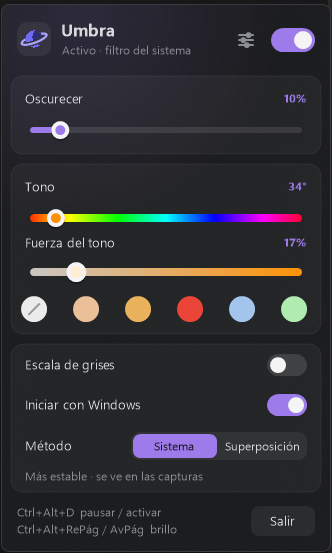
Umbra dims and tints your screen beyond your monitor's minimum brightness. Perfect for gaming, drawing or working at night without your screen blinding you.
Unlike other dimmers, Umbra does NOT disappear when you switch windows. It uses Windows' own color filter, so it only turns off when you pause it or close it.
✦ FEATURES
• Dim up to 90% (never a fully black screen).
• Color tone with adjustable strength, plus presets: Warm, Amber, Red night, Cool, Soft green.
• Optional grayscale.
• Two methods:
– System: Windows' built-in color filter. The most stable.
– Overlay: invisible in screenshots and recordings (great for streamers and taking screenshots).
• Lives in the system tray. Click to open the panel; middle-click to pause.
• Global shortcuts:
Ctrl+Alt+D → pause / resume
Ctrl+Alt+PageUp / PageDown → brighter / darker
• Reapplies itself after locking the PC, sleep or monitor changes.
• Glass-style panel with customizable accent color.
• Optional start with Windows.
✦ LIGHTWEIGHT
• A single portable .exe: no installation, no dependencies.
• About 6 MB of RAM when idle, 0% CPU.
• It doesn't touch your windows, focus or cursor. It's just a filter.
✦ REQUIREMENTS
Windows 10 or 11 (64-bit).
Download
Click download now to get access to the following files:
Leave a comment
Log in with itch.io to leave a comment.